Posts

Showing posts from February, 2011

Update site with awesome social toolbar by wibiya

Image
Update site with awesome social tool bar by wibiya . The more I test the toolbar the more I am in love with it. It is the sweetest and smartest browser upgrade tool I have seen in years! It make your website and blog looks smarter with seamless integration. You guys can also browse and chat and share images or video with your friends thru Gmail, Facebook, and more without having to leave the blog. It makes you feel a little more closer like a community than previously. Wibiya built a cool toolbar which is useful, neat and builds on current trend in websites. Another advantage is the easy installation and configuration. The plugin is easy to install. This toolbar is very user-friendly. Also new applications are added to the Wibiya platform all the time. I would suggest you play with it by click on all the buttons.  They are addictive, interactive and fun.  Feel free to give me the feedback on the comment below.  Don't forget to try to chat with each other while ...

BulletStorm inspired speed painting process

Image
Speed painting tutorial Bullet Storm .  I've been enjoying Bullet Storm for the past few days. The game looks gorgeous and the game play is awesome. It is pretty violent, but really what else do we expect from 1st person shooter games. We buy and play shooter games because we want to, well, shoot! I would not recommend it for kids under 17 though because it is ultra violent and tons of blood splatting action. Then it's time to paint but I couldn't get the fun off of my mind. So I decided to just paint a piece inspired by Bullet Storm . In this speedy, I used tons of custom brushes. Yes, I think it is time for me to really go all out with custom brushes. Since I started this blog, I've been holding out on using custom brushes just to get the point across. Get the foundation first, which are shape (correct drawing), value, color and edges. Once you get it, no matter what brush you use, it will be good. This piece, I basically start out very much the same w...

How to draw Manga Kenpachi from Bleach

Image
How to draw Manga Kenpachi from Bleach .  Learn how to draw Manga, Anime, and comics. Drawing and sketching anime technique for manga, cartoon and comics. Learn to draw with tips from Video and step by step tutorial. I usually look at the image and try to break it down into simple geometry shapes.  It is a lot easier to draw once you observe the over all shape of the object or person you are trying to draw.  I usually start of using circle as a base for character's skull, then next step would be figuring out the next geometry form to fit into the image. Kenpachi is a muscular Shinigami with a wild and aggressive appearance that fits his personality. He wears a sleeveless captain's haori that has a ragged look to it (which belonged to the previous captain and was taken after his defeat). He styles his spiked-hair with small bells at its tips and wears a special eyepatch on his right eye, created by the Shinigami Research and Development Institute, to suppress his...

Using brushes in Photoshop to create edges

Image
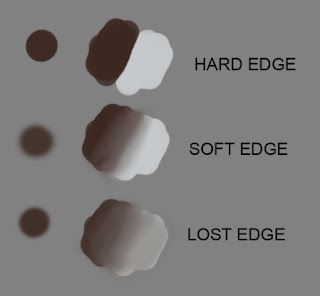
Painting edges in illustration .  Digital Painting Technique, using brushes in Photoshop. Brush is a very essential tool for painting. Without it, there would not be a painting. In traditional oil painting, there are many different kind of brushes for you to pick from. Though the most common brush many painters use are simple round and flat brushes. With just two simple kind of brushes, good painters can achieve an amazing piece without having to have any special fan brush or other texture creating tools. The same principle apply in digital painting. Basically in most painting program (Photoshop CS, Painter series, Gimp, etc.), we have default round brush soft and hard. And with just these default brushes, we should also be able paint a good piece without having to use any fancy custom brushes. I am not suggesting that we should not use custom brushes. I use a lot of custom brushes in my painting, and I strongly encourage you guys to use them in digital painting. Onl...

Achieving looseness in painting, digital painting thought

Image
Photoshop painting tutorial achieving painterly effect  or looseness in digital painting.  my thought on digital painting. Many people asked me how did I make my digital painting in Photoshop looks so traditional like and loose. How do I make my piece look so analog instead of look very digital? Well, I've been thinking about it for a long while. As I analyzed how I paint and doodle around in Photoshop with my Wacom tablet and pen. I was thinking possible because I used to paint in gauche and acrylic before I even know digital painting exist? I don't really know, but I know what should my painting look like in the end. And possibly because I admire many oil painters such as John Singer Sargent, John Williams Waterhouse, Ander Zorn, Rick Berry, Richard Schmid, and Frank Frazetta. They are master oil painters and I always hoping that some day I could do something as great or somehow close to that caliber of work. Anyway, I think the work of most artists often ref...

How to draw Cammy Street Fighter Manga

Image
How to draw Cammy Street Fighter Manga. Learn how to draw Manga way, Street Fighters' characters. Drawing and sketching technique for manga, can also be used in any cartoon and comics. Learn to draw with insight from Video and step by step tutorial. It is very useful if you can look at any subject and able to break it down into simple geometry shapes. You can always practice it even when you are not drawing to keep your brain stimulated.  Very good observation exercise for artists.  It is a lot easier to draw once you observe the over all shape of the object or person you are trying to draw. I usually start of using sphere or circle as a base for character's skull, then next step would be figuring out the next geometry form to fit into the image.  Or any big geometry shape you see first when you observe the subject then go from there. Cammy was one of the four "New Challengers" introduced in the fourth Street Fighter II revision, Super Street Fighter II. I...

How to draw Luffy from One Piece

Image
How to draw Luffy One Piece a Manga character Monkey D Luffy. Learn how to draw Manga, Anime, and comics. Drawing and sketching anime technique for manga, cartoon and comics. Learn to draw with tips from Video and step by step tutorial.   A bit about the character: Monkey D. Luffy (モンキー・D・ルフィ Monkī D. Rufi?) is a pirate and the main protagonist of One Piece. He is the son of the Revolutionary Army's commander, Dragon, grandson of the famed Marine, Garp, and the foster brother of the late "Fire Fist" Portgas D. Ace and Sabo. His life long goal is to become the Pirate King by finding the legendary treasure left behind by the Pirate King, Gol D. Roger. He believes that being Pirate King means you have the most freedom in the world. Here is a Manga face of Monkey D Luffy sketch break down.  It will be easier to understand how his face is constructed. Here is a final Manga drawing of Luffy Below is a Manga drawing video tutorial, Luffy from One Pie...

How to paint Paladin in steel armor

Image
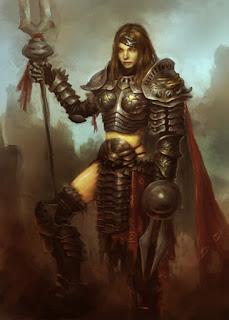
How to paint character in steel armor .  Paladin female warrior in steel armor with bunny design. It is finally done! It takes me about 6-8 hours to actually paint total. Continuing from previous post, the idea derives from the year of the rabbit. It has been quite a while since I did a heavy knight set type of armor. I used to do it everyday at ArenaNet. :-) So I guess I miss making heavy armor design a bit. So partially I think I did it to satisfy my character with armor design craving. In this design, I first just focus on the shape of the overall body (silhouette). Once I figured out the silhouette I am looking for, I will start to paint and render them out. It is a lot easier to get the big picture down first, then paint in little tiny detail afterward. You can have in mind what kind of detail and design you are aiming for, but just keep it at bay until you can settle with your overall look of the armor as a whole. Most of the time when I work on the armor ...

How to draw Akuma from Street fighter.

Image
How to draw Akuma from Street fighter .  Manga tutorial, draw Akuma from Street fighter. Learn how to draw Manga way, Street Fighters' characters. Akuma (the great Demon). Drawing and sketching technique for manga, can also be used in any cartoon and comics. Learn to draw with insight from Video and step by step tutorial. Akuma's head has a very almost rectangular rather than typical taper down egg shape. His facial structure demonstrated masculinity, agression and power. Before you start drawing, it is very useful if you can look at any subject and able to break it down into simple geometry shapes. In this case, you can see strong rectangular shapes and random flame on top as his hair. Breaking your subject down into simple shape is a very good observation exercise for artists. It can be a lot easier when you already know the geometric structure of the subject. Akuma (in Japanese, "Devil") known in Japan as Gouki (豪鬼 Gōki lit. Great Demon?), is a video...

How to draw fist hand 5 different ways

Image
How to draw fist hand 5 different ways step by step and video tutorial.  In this tutorial, I will show you the easiest way possible to draw fist for you to implement in Manga or comics.  It is always easier to break down complex object into simple shapes.  By logically analyzing the object and break it into simple shapes and forms, you can basically able to draw everything possible. Here is another video and step by step   how to draw a basic hands video tutorial  instead of fists or clinch hands.   There is also more hand tutorials both how to draw hand holding sword and  Drawing hand holding a gun Here are some of the fist images Below is a video tutorial how to draw fists Here are some images of the process of how I draw fists 1) I start off with simple square shape. 2) I then add a rectangle shape on top as a rough shape for a thumb 3) Add two more rectangle inside the initial square, top one serves as a rough guideli...

How to draw Manga, Miku Vocaloid

Image
How to draw Manga Miku Vocaloid .  Learn how to draw Manga, Anime, and comics.  Drawing and sketching anime technique for manga, cartoon and comics. Learn to draw with tips from a professional concept artist and illustrator. Drawing Manga, Comics or anything could be easy if you simplify the complexity of the subject. When you see a figure in different poses, try to capture the main body or the most noticeable part first. Then simplify the shape of the main idea into a big simple geometry shape. Then move on to the next part and do the same for the rest. It is very useful if you can look at any subject and able to break it down into simple form. It can be very good observation exercise for artists. It is a lot easier to draw once you observe the over all shape of the object or person you are trying to draw. I usually start of using sphere or circle as a base for character's skull, then next whatever shapes or forms that fits into part of the image. What is Voc...