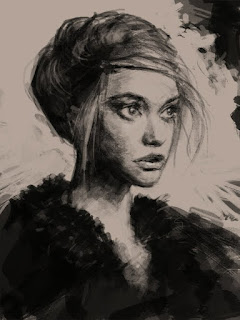
Create illustration from portrait drawing. Art illustration draw step by step online. This post is pretty much continue from the previous posted Portrait study turns into quick illustration. In these steps, I just start assigning colors onto the existing values then slow paint them over the sketch as I see fits without changing much of the values. Then I added or changed the hand that holds an apple, and the other hand to hold an ear-bud. Then I thought it would modernize the piece and it will be a nice contrast to the lithograph painting style I am trying to accomplish. Then I slightly change some values on her face and her hair and the surrounding area because I thought it was a little too dark comparative to the environment. I just have to look at the over all image and see it that would fit. On the final stage, I decided to do the outline to emphasis the old school lithograph style to finish it off. Just hoping it will work out. :) If you are new to this blog, just be patient and browse around the blog. Thumbnails on top and the topics along the side of the far right column. But there are some of the video I would recommend for basic lessons on how to draw and paint portrait and facial structure. These tutorials will guild you to a basic how to: How to draw lesson girl face, How to draw person head basic and Draw and render human head with different light sources. (These two are a little more basic). And a little more along the traditional art study, go watch How to draw lesson girl face, How to draw person head basic. And digital painting tutorial rogue samurai female. As for the face or head (women, female) Draw girl's face how to lesson video and step by step and learn how to draw face, woman. For a little more advance stuff if you are already familiar with Photoshop or painting, you can also watch these tutorials for learning how to render face (for basic structure from start to finish) Character Design Face Male Merchant Character, Character design sketch villain or Drawing Male Face Swordman and Learn how to draw and paint face. They might be what you are looking for.Enjoy the video tutorials, hope you learn something about drawing and painting on this blog.
Here is the final portrait turns illustration piece "Seduction"
How to draw portrait with charcoal. Portrait study turn into quick illustration. I was doing some portrait study and do step by step for the blog because I had no idea what to do at the moment. Yes, lack of inspiration happens from time to time especially when you leave you pencil and pen for a while. So I was sketching until it almost complete then I looked at it and I was like...um I could actually turn it into something else.
So first idea I had was I could put really dark over coat on her and then...a knife in her hand. I can make her an assassin! But then I thought I always do that let's change the course a bit this time. Something I don't usually do.
Then I had an idea of a garden surrounded her present and... while I was painting a camouflage or silhouette of tree branches and bushes I got an idea. Snake came to my mind. Then I totally get in the feeling of the piece. Eden, snake, apple and eventually the word "seduction" in the conclusion.
Anyway, here are the step by step for the work in process and the final piece I have so far. Still have to paint for a few more sessions.
Here is a portrait study so far and to be continued.
Here are step by step process, portrait study
Then portrait...
And it turns into something like here as my idea arrives.
and eventually here Next step goto: Art illustration draw step by step
Painting reclining female figure. Here are step by step of my figure study nude reclining lady. Just want to practice more figure and facial structure and hair on this one. Lots of time I spend on her hair and still not to the point that I want from the painting yet. I still have some work to paint more hair and such to get a good result. In my opinion, painting hair is the same as painting any object from light using light and shadow as guideline, but it slightly trickier because you better off using some sort of texture to refine it along with regular brush, same as in oil painting. Hair is one of the more difficult subject to pull of successfully. But once I heard some master said one should keep it simple like the rest of the painting and not to complicate it. Im still trying to figure out what that means. In this post studying values and some experimenting on monochrome toward adding some more colors after I define the values as you can see in the step by step images process. Still a lot more painting to be done.
this tutorial Ill show my favorite method of drawing in photoshop. I'll take my black and white illustration and show how to achieve a quick rendition to a color concept. Showing a few of my drawing steps along with how to achieve the quickest color selection I see fit. Going over my method for quick sketching and color sketching, also visually showing stylistic and design ideas -Richard Anderson.
I thought I would pimp it out. :) The Download is NO LONGER AVAILABLE
The Download is NO LONGER AVAILABLE Check out the tutorial if you are interested in learning some good tips and tricks.
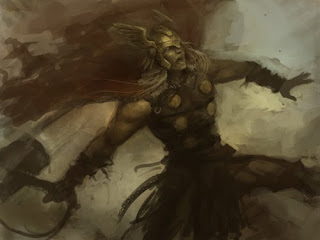
How to paint Thor. A speedpainting final update. Here are the final steps of how to draw and paint Thor. Just touch it up here and there, not a lot of changes from the last post of the Thor tutorial.
Anyway, this post is a little more intermediate level, and it' might be hard to follow for beginners. If you just first visiting and find idrawgirls.com you are in luck, we also have a lot of basic tutorial for beginners alike accumulating over a few years. Look around and you will find something suitable to you. And it's great that we have more advance level to look at, hopefully they inspires young and old artist's souls alike. I would recommend for beginners and experiences drawers to go watch any of these following videos How to draw Fantastic 4 Susan Storm (basic comics style drawing with pose) and watch How to draw comics superhero spiderman, and my How to draw comics character Hulk, it also has coloring or paint over tutorial. Also the new arrival video tutorial, How to draw Captain America. And an older video tut, How to draw Batman or Darknight. More drawing tutorials are coming up...stay tune! :)
Draw realistic face tutorial front view. This post is a portrait study I did using Wacom tablet to practice portrait drawing for digital art. In this one, I am trying to use just default round hard and soft in Photoshop, not using any fancy or custom brushes just to see if I can carry it to the end. Most of you ask, what kind of brush do I use. I used a lot of brushes, but that's not the point. Most of the tutorials here that I made, I am trying to bring the principle to the audiences. Foundation in art practice is the most important things one could learn. Because once you understand the principle like lines (correct drawing), shapes, and values (gradient, tones) along with understanding soft and hard edges. Most importantly how light effect your subject, you can carry all the knowledge across the medium. Digital or tradition is does not really matter, they are just tool we use to transfer our vision onto paper, canvas, computer to ultimately communicate with audiences If you understand the principle of how all the terms I am talking about above react and utilize them efficiently then you can at your best ability transform your thought onto any medium you wish. Portrait study is a great way to practice, it never gets old. Artist can always get better as he or she practice more with observation and determine to gain knowledge or insight to achieve the best possible outcome of the piece. Drawing people is one of the most difficult thing for any artist. Especially when you want it to look certain way and have different lighting, mood or even expression from the subject.
Anyway, here is another female portrait study front view.
This one I only use default round brush soft and hard in Photoshop: =)
Below are step by step draw and render portrait tutorial
1) I start of with the somewhat egg shape but a little angular because I want her to have a strong jaw line. I lay out the flat skin color (desaturated pinkish or egg shell color, any skin tone you prefer) as a base. Then I mark spots for where I would put her eyes. I paint the whole eye sockets because they are part of the face that usually case the strongest shadow, other under the nose and under the upperlip.
NOTE* It's a big jump from Step 1 to Step 2 if you are wondering how to structure the facial feature, go to my previous tutorial how to draw face. Very basic stuff, now the puzzle is solved.
2) At this stage, I add some soft shadow all over her face very soft, then some shadow all the way from under her cheek bone on the side to her shin line to indicate three dimensional object and establish light source direction (light's hitting from the front). Then I went in to draw her eyes outline, eyebrows, nose tip, and lips. Thought these lines are not here to stay, they are there to give me some sort of guideline so that I can accurately put my paint on where I want them to be.
3) Paint as if you sculpt, the reason I put some soft shadow over in the previous stage so that I can pull out the light and give it an illusion of a 3D object. I paint the lighter value of color over the area that the light source would hit. At this stage, don't get caught up in detail, just layout the simple shape and flat color. I put lighter value all along her nose bridge to the tip, her cheek, the area above her upper lips, and her shin (These are the area that will get hit directly by the light source I previously established). Notice that I also add some strong shadow on to both sides of her nose bridge and darken the eye socket a bit to accentuate the form that was given by the light source.
4) Now I am working on her nose tip (Usually where it will get the highlight and strongest shadow). When working on nose try not to think like drawing, think of light and shadow. I usually don't draw nostrils, I just shadow it out or dark it out because most of the time you don't really get to see them if you squint for value (the more practice painting from life you will get the better result than using photo ref) . But on this one just for demonstration purpose I will do them just for the hell of it. Notice I painted in only two value under the nose, I can usually get away with one when painted.
5) Then I am looking for place where I can put darker shadow on her face to make her feature more prominent. Dark line in between her lips, more dark paint around her eye sockets and her eyebrows.
6) Now it's time to tighten things up by finding place to put my darkest value onto the image, under her shin, under her eyebrows (sockets), and some on the side to create sharp edge for the painting. I also bring some light out on her eyes a bit.
7) Tweak and refine the feature here and there, no major value or hue change to tighten up or clean up a little more.
8) Now I am lighting up her face a bit more by putting more light value her to her nose tip, above her lips and a bit on her shin.
9) As the face is coming along and look like a face then it's time to bring out some detail and put some highlight on her. At this stage I paint in her irises with highlight, a bit on the tip of her nose and on the edge of her upper lip. These area get hit by the strongest light.
10) Refinement, clean up and finish up...in this case I darken her eye lash (adding shadow underneath) a bit, add some highlight on her lower lips, touching up her nose
11) Adding some hair on her face would be nice, and some highlight to give it dimension.
Here is the one with just using Default Round hard and soft brushes. For bigger image go here: Learn portrait drawing
This one I touch it up in the last minutes with custom brushes because I want more painterly look and variation of textures. For bigger image go here: Learn digital painting
Over 2 hoursof Video tutorials, included 14 Chapters
Full Length HD Video tutorial on How to draw and render 6 different female faces. In Depth and Intuitive!
Review from our Customers. “You are not only a superb artist. You are an excellent teacher.”
“I have to say thanks to you and watching your videos over the years and homing my skills has helped me get into the industry too have been working with a game company for months now and its down to how your videos inspired and helped me. So thank you :D this stuff is also epic ! And Thanks i really appreciate all of this.”
“I love you're videos because you explain what you are doing ewally well and they are very informative Thank you...and keep up the good work.” “For anyone who is afraid of spending a little money on buying any of the Premium tutorials on idrawgirls.com I gotta say I have tried the Dark Warrior male concept tutorial and it is worth the money. You guys will not be dissatisfied. He is extremely knowledgeable and explains things really well. I know I am happy with it.” Read more comment on Facebook: http://www.facebook.com/idrawgirls Youtube: http://www.youtube.com/idrawgirls Join our Art community at ArtistsArena.Org (See art work from our subscribers)
Speedpainting tutorial Mech robot Gaiking Digital painting process. Here is how to draw and paint speedingpainting study video tutorial and step by step image process. Well, speedpainting definition, as far as I understand, from the concept art standpoint is usually a study of subject (values and composition mostly) that is done in one sitting (approximately 20-60 mins or could be up to couple hours but not more).
Anyway, I felt inspired yesterday after watching Gaiking Trailer. Didn't even think that 1970s giant robot will ever come to life on silver screen. I really hope it will be well done as a good movie so that we can see more of many giant robots in movies soon in the future. I don't mind Transformer, but really they aren't my favorite. I think the Giant Robot Mecha in the 70s are the most badass and they are the first of their kind. :)
And if you really like Mecha stuff these video tutorials are made especially for those who wants to draw and paint Mecha robot Drawing Mech or Mecha Tutorial (this one show quick sketch and painting mecha, kinda cool. One of my better ones). And this video, Concept tutorial Drawing Giant Mech, also pretty similar to the first one in regard of painting process. Digital drawing tutorial Mech soldier is different approach almost peedpainting like video and somewhat gets different result than usual. Also you can find some more mech or robot tutorials by browsing thumbnails on top of the blog.
Here is a final speedpainting study of Mech GaiKing:
Watch Digital Painting Video tutorial Speedpainting Gaiking:
Please help us by clicking the "Like" button to spread the words, thanks ;-)
FREE download, Photoshop custom brushes!
These are a few songs I usually listen to when I am working on a Mecha or robot painting design. It has a very aggressive mechanical rhythm sound, but pretty melodic synth. I cannot really explain but they make me immense into the world of unknown easily.
Draw arm muscles back view video tutorial and step by step images. Drawing human anatomy tutorial demonstrate arm muscle from the back. Learn drawing and sketching from video tutorial and step by step images. This tutorial will show you how to draw basic arm muscles in male anatomy from the back side. I usually start of with basic geometry shapes to simplify the forms and process. After you have a rough shape or under drawing then you can start tightening up your drawing creating Deltoids or shoulder muscles.
Then along the way down we have slightly view of bicep from inner arm then triceps muscle is highly visible or dominant the upper arm toward the further away the body.
Then down to forearm, moving from closer to body to way outward, we have Pronator, Bluge, and Extensor closer below to the wrist. Watch the video down below then you will know exactly where to locate, draw and sketch the mentioned muscle groups.
This tutorial is part of anatomy study of male muscle groups that can be used for comics, manga, anime and video game concept art. Learn how to draw simplify arm muscle structure start with using simple shapes to finish pencil render.
Arm muscle Back View
Here is a video tutorial: How to draw arm muscle front view:
There is also a few more basic tutorial that involve in drawing arm and body (torso) if this is too fast drawing here: how to draw man upper body basic, Drawing muscle body basic -torso 3/4view with shoulder and arm Male (man) and Female (woman) upper body **How to crrectly draw arm and torso together.
Xia Taptara (黃曉聲 Huang XiaoShēng), currently a professional freelance concept artist and illustrator for games and films, formerly a concept/ 3d character artist for ArenaNet (GuildWars & Guildwars 2), NcSoft Seattle from 2002 to Sept 2010. I also did various of illustrations and concepts for many publishers & clients (Song of Ice and Fire: Game of Thrones, Cthulhu series, Pathfinder, Winnie the Pooh, Monster Inc., and more). I use Wacom Tablet Intuos and Photoshop CS2,3,4,5 to do most of my professional art work. I use pencil, pen, and traditional medium in my free time. I founded IdrawGirls.com (TheArtClasses.com) in 2007 to motivate myself to create more and better art. Also I get to draw and paint whatever the hell I want to. Hopefully I can inspired some young soul and old soul alike.
*QUESTIONS & COMMENT: PLEASE POST THEM ON THE BLOG.
Or CONTACT ME via idrawgirls Facebook page.
DO NOT E-MAIL ME. Thank you. ;-)