Posts

Showing posts from July, 2009

Creature Concept design step by step paint over line art

Image
How to paint ogre dragon .  Creature Concept design step by step paint over line art. Here we go again, I am digging out some of the sketches that I did and try to give it a better version or finish it up. This time, it's some sort of giant dragon type of creatures. It doesn't really look like a typical dragon, just a variation of its kind. We do that a lot when we try to concept creatures and see what kind of stuff we can come up with that look different, but not totally far off. It was totally fun because I haven't really done any creature in long while. It's still a work in process and hopefully I will finish it up in a couple more sitting or approximately 3 hours of thinking and couple hours of painting. :) Here is what I have so far... "Green Stripes Dragon" Here is the creature concept painting process step by step ALMOST there! To be continued.... Watch the sketch video how to draw Green Dragon: PREMIUM TUTORIALS: ...

Guild Wars 2 Official Trailer sneak peek from ArenaNet Team

Guild Wars 2 Official Trailer sneak peek from ArenaNet Team. It's been 3 years since the last installment of GuildWars. The Guild Wars team at ArenaNet and I (Mostly them new blood and old blood) have been working really hard to put out one of the BEST MMO ever made! The production process and everything have change along with many new technology that emerges in the past three years. Guild War 2 will look even BETTER visually, I know so because these guys are working really hard to make everything look beautified! Gameplay and lots of things are changing to the better and funner direction. You will have to read that from official ArenaNet site or GuildWars2 site for more info. I just art. :) And I believe this is the first trailer from the most anticipate MMO EVER! Watch Guild Wars 2 official trailer! Coming soon to any computer near you! I know, I know...I am pimping out our own game. But it's AWESOME! Peace!

Small update on Mecha robot

Image
Quick update on the Mecha robot at its hidden base. :) Look around and click on thumbnails above for drawing and painting video or step by step tutorial. Sorry guys, I have been very busy, but will update on the post soon, You can see the step by step how to from the previous post here: Digital Painting Mech Robot Modified . Go here to download bigger version Mecha Robot Cave FEATURE TUTORIALS:

How to draw Hulk 2

Image
How to draw Hulk side view . Learn How to draw Comics character The Hulk Here is another attempt of drawing Hulk. I was having too much fun playing around with drawing and studying muscle groups. This post contains two videos. :) First video demostrates how to draw and sketch a SuperHero Character Hulk from side view. The video demo shows you a bit of side view male anatomy (arm muscle groups) and dynamics in the positioning of the figure and the details. Second video is about applying color and paint over. It shows you how digitally color and paint over Hulk drawing. This drawing video demo shows you a bit of essential foundation of digital painting such as values and color on the HULK. A bit about Hulk, he was created by Stan Lee and Jack Kirby, the character first appeared in The Incredible Hulk #1 (May 1962). The Hulk is cast as the emotional and impulsive alter ego of the withdrawn and reserved physicist Dr. Bruce Banner. The Hulk appears shortly after Banner is ac...

Bounce light or Under lighting tutorial

Image
Bounce light or Under lighting tutorial from experiment and painting around. I thought I finished the "Agent Pink" (Anime girl) since the last post, but I could not help looking back at the piece I did prior to this "Rogue Sword" aka Samurai girl here Digital painting process character . Then I thought how would I make it at least up to the par or could it possibly be better in term of artistic execution. So I had to repaint the "Agent Pink" and it take me a while to figure out how to turn this one in to something that is NOT realistic looking but a good looking piece. So I start playing around and give it under lighting or bounce light, changing the background color, then everything sort of comes together in the end. Then I really like how the bounce light I painted turn out, especially on her green form fitting suit. Then I struggle with the face so I thought I changed her expression and it works! It takes a lot of experimenting, thinking and...

Figure study female form step by step process

Image
Figure study female form step by step process. It's been a while since I did painting study of female figure. So I decided to do one or maybe a few quick figure painting study of a female body form. It was kind of rusty to begin with, struggle in the middle since it's been a long while. But after a couple hours in, it seems a bit easier but the result comes very close to what I want. I just want to study simple form of painting, not really going for the all the way realistic approach. Note to take on this one is that, I should have established more edges to get the image looks really painterly and smooth. I should try again soon. I start off with drawing or sketch to constructed the shape and form where I will be painting over. I am looking for the post that are interesting enough to look at rather than static. Then I use soft edge round brush to establish values then skin-tone for the figure. As it progress, the softer look become more define using hard edge round brush...

Creature Concept design process Update

Image
Creature Concept design process Update. Here is a final version of color concept Green dragon. Yeah, if any of you guys remember I had the sketch over a year ago along with the video tutorial of how to draw this guy. You can go watch it here creature concept design step by step (I embedded the drawing video along with the last post). And I think during that time I made a few more video about drawing creature...there are how to draw and sketch dragon head , this is one of my favorite design I did. Ah... How to draw creature monster creature (this one has a unique head, sort of like a lion in the way). Both How to draw dragon creature and learn how to draw and sketch dragon are the ones that look the most typical style dragon we see. You might also wanna check out How to draw female character Dragon Slayer. There are also step by step painting process Nocturnal Creature tutorial and Giant creature painting step by step . Anyway, here is the Green Dragon Creature or something...

Digital Painting tutorial video and step by step Court Lady

Image
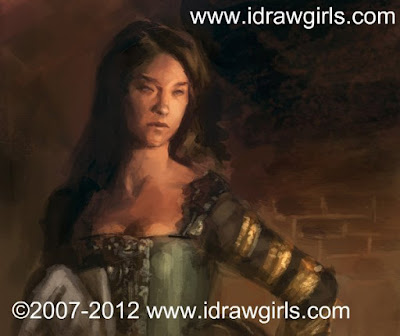
Digital Painting tutorial court lady   video and step by step . I know it's been almost a week since I update any drawing or painting...been busy with the Manga comics. And of course work at ArenaNet :) Now, this tutorial turns out nicely. One of my better ones. It doesn't take long and turn out the way I want. Surprisingly that doesn't really happen a lot because we all want to push it even further as an artist. The more we paint and draw the more experience, we tend to see more mistake and how it should have been better. Anyway, here is a painting of a court lady...part of a small project I am working on. So if you like this video here are some of the video that have similar content just a bit different in presentation digital painting tutorial sleeping beauty . Another is Digital painting female character red and the recent pieces Drawing Tutorial Zombie ninja character But if you are looking for more specific study of anatomy then watch Drawing body mu...

Mecha Mega Robot update almost done!

Image
Mecha Mega Robot update almost done! Here is the 4th of the Mecha MEGA Robot visual character concept art process UPDATE (there are previously posted of part 1: Mecha Robot step by step drawing , part2 Painting Mech process tutorial and part 3 Giant Robot drawing and painting process ). I try as much as I can to finish it up this weekend but unfortunately...I can only find a few hours to play with it. I amped up the Machine gun, changed and tweak the design a little bit on the bottome half. It's been a really fun session creating mech since I haven't really done a full launched Mecha in a long while. A few more painted session then I think I will call it done. ART tips: Talent is often overrated, and often deceive you. Whether you have it or not, forget that it's there. Practice, practice, and practice is only one sure way I know will make me the better artist. The Mega Mech is almost there Here are step by step recap 1) Thumbnail...(do about 8-10 then...