
How to draw face soft shading.
Manga Tutorial, drawing female face soft shading. Learn to draw and shade face, feature of female, woman, girl or lady. E-lesson online free step by step and video tutorial.
Here is final a quick sketch of woman's face
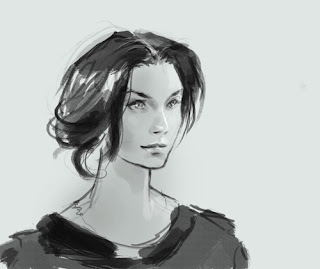
Here are step by step draw and sketch female face:
1)

2)

3)

4)

Watch the video process tutorial, how to draw face
Drawing Software & Tools I used and recommended:
-Genius MousePen 6x8
-Wacom Intuos3 6X8 Pen Tablet
-Bamboo (Small) Pen Tablet (new from Wacom!) Economy for everyone.
Softwares:
-Gimp (Free Download)
-Adobe Photoshop CS2 (Professional software)
*You can just use pencil, paper, markers on this one...just practice rendering.
New tutorials:
-Drawing and painting female nurse cartoon.
-Concept Art tutorial, magma river lava environment.
-How to draw chibi robot Gigantor step by step
-Drawing mutant humanoid creature head
-Digital painting tutorial technique Mecha commando
-How to paint water and mountain landscape technique
-Art tutorial, how to paint gold armor
FEATURE TUTORIAL:


** If you have any basic questions or specific please looked up Q/A section. Most of the time your questions has already been answered in Q/A.
If you need any help or support you can
-post questions or comment on the post (seems to be the fastest way to get response)
Peace,
Here is final a quick sketch of woman's face

Here are step by step draw and sketch female face:
1)
2)
3)
4)
Watch the video process tutorial, how to draw face
Drawing Software & Tools I used and recommended:
-Genius MousePen 6x8
-Wacom Intuos3 6X8 Pen Tablet
-Bamboo (Small) Pen Tablet
(new from Wacom!) Economy for everyone.Softwares:
-Gimp (Free Download)
-Adobe Photoshop CS2 (Professional software)
*You can just use pencil, paper, markers on this one...just practice rendering.
New tutorials:
-Drawing and painting female nurse cartoon.
-Concept Art tutorial, magma river lava environment.
-How to draw chibi robot Gigantor step by step
-Drawing mutant humanoid creature head
-Digital painting tutorial technique Mecha commando
-How to paint water and mountain landscape technique
-Art tutorial, how to paint gold armor
FEATURE TUTORIAL:
** If you have any basic questions or specific please looked up Q/A section. Most of the time your questions has already been answered in Q/A.
If you need any help or support you can
-post questions or comment on the post (seems to be the fastest way to get response)
Peace,
Comments
knights and brothers (sisters) I have a photoshop problem... do you think I shall post it on the community page too? I really need some help!
Thanks & Peace!
In a week I am gonna draw as well.
I can still draw with the broken arm but slower.
dreamlit@gmail.com
I usually don't merge the layers, but if I'm going to edit the image as a whole, I'll group all the layers together, copy the group and merge it.
maybe u can explain further.. it seems the only way to retain the effect of the blend mode is to flatten the image...
but xia doesnt do that.. based on his videos. he either does multiply layer or overlay.. draws with the mode.. merge down with no ill effect. when i do it and alot of others.. the effect is gone and messes it up. it either becomes darker or lighter depending on the blend mode.
If not it will merge and set the blending mode to the layer it was merged to and therefore changing the effect.
Hope you succeed... it shouldn't be that complicated!
Peace
Hoping everyday that the next one will be better than the last but it's really hard to consistently do that.
dahaca> Left arm could use, but it probably slow and crooked, though it will help you think about the lines you put down more. Get well soon brother!
sanna> Thank you dear, I am glad I can be useful. The edge of the upper lip are usually get the highlights. Notice when you are talking to people or people watching you will see what I mean. :)
anonymous>> Sorry about that. That's why I put the note on the tutorial says "**It is recommended that you previously watched *Female Figure I and *Female Figure II " reason because they are slower in process. But the girl with gun is a bit faster.
**You should also state that you watch more than once if you are really a beginner and never use PS before.
Thank you fellow brothers pokepetter and luca for trying to help us out. :) They are right!!!
Anyway, you have to watch it again, I usually copy the background (base) layer then put them in the folder as I make more layers. In the beginning there will be some multiply, overlay layer, but then after I arranged the basic value and comp, I merge them all down to the base layer.
Then after that I just start painting over and use normal layer if needed.
Everything you do will pretty much involve around the base layer. Not the other way around. :)
*You can only merge multiply or overlay...any layer other than normal to the base without altering the effect.
Be patient and keep drawing and painting.
These are just a very basic stuff, the more you do soon it will become your second nature.
Pokepetter> Well explain, thanks
luca> thanks for helping us out brother.
I love fast sketches ,I think they look more artistic..
im not a beginner.. im well versed and know all the shortcuts and actions blah blah.. this was just one thing i never understood..
the thing is i have been merging with a normal layer below it.. but the normal layer was transperent cuz of the brush. so it didn't work..
the base layer needs to full be 100% opacity or u will see some weird stuff happening
thanks alot everyone!
-ricefarmer
the tutorial some other time, battery
is almost dead...
When time premits, Ill post some
photo's ext.
Anonymous> Cool brother, glad the layers confusion has been clarify. If you have any more question, feel free post them on the blog. I am sure we can also clear that up for ya.
The site background is actually #f8f8ff (light blue gray), close to #FFFFFF (white) but not actually. You have the point of painting on the white background, I will see what I can do.
But for sure I will watch out not to have any neon green text in there.
Knuckles> Great to see you back bro! Photos would be awesomely inspiring.
paan> here http://snipurl.com/j5q7m good luck.
Post a Comment